What Is Paigham? Your Masjid, Your Community, One Place 🕌
What Paigham is, who it is for, and how it helps you follow your masjid, see its timings and announcements, and use Quran, Hadith and everyday tools.
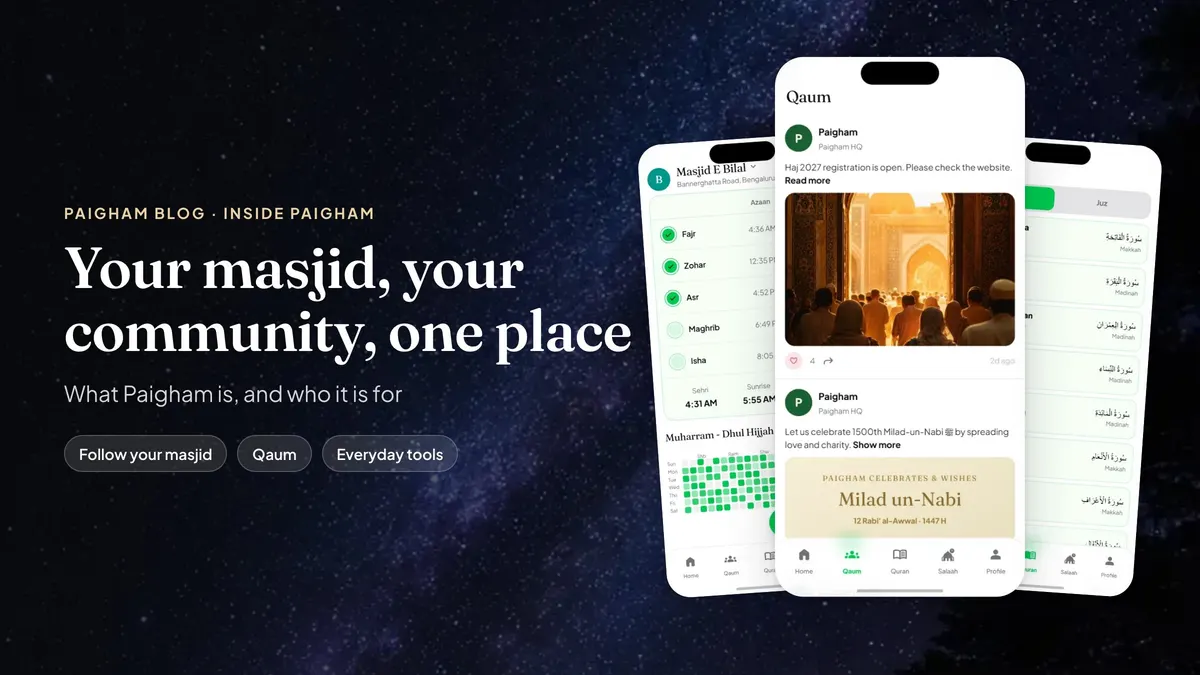
Imagine moving to a new neighbourhood. On your first Friday, you find the nearest masjid. Then the questions start. "When is Jumah here?" "Is there a class for the children?" "Who do I even ask?"
The answers exist. They're on the notice board, with the committee, and in a group you haven't been added to yet. 🤷
What if you could find that masjid by its pincode, follow it once, and have its timings and announcements come to you from then on?
That's Paigham: a community and masjid platform for Muslims in India, built around the place where you pray. Paigham already lists more than 23,000 masjids across India.
Let's take the tour! 🚶
The Golden Rule: Masjid First 🧭
Paigham starts with your masjid and your neighbourhood. Prayer times are part of it, not the whole of it.
Why does that matter? Because a masjid is more than a timetable. It's the people who pray together, the committee that looks after it, and the community around them. Paigham is built for all three.
Who It's For 👥
✅ Musalleen: the people who pray at a masjid and want its timings and news in one place.
✅ Committees: trustees, imams, secretaries and volunteers who need to tell everyone at once.
✅ The wider community: families, students, neighbours and friends who want to stay connected, read and learn together.
Big city masjid or small village masjid, Paigham is built around where you pray. 🏡
Follow Your Masjid: The Heart of It All 💚
Find your masjid by pincode or by scanning its QR code, then follow it. You can manage the masjids you follow from the Following Masjids sheet on Home.
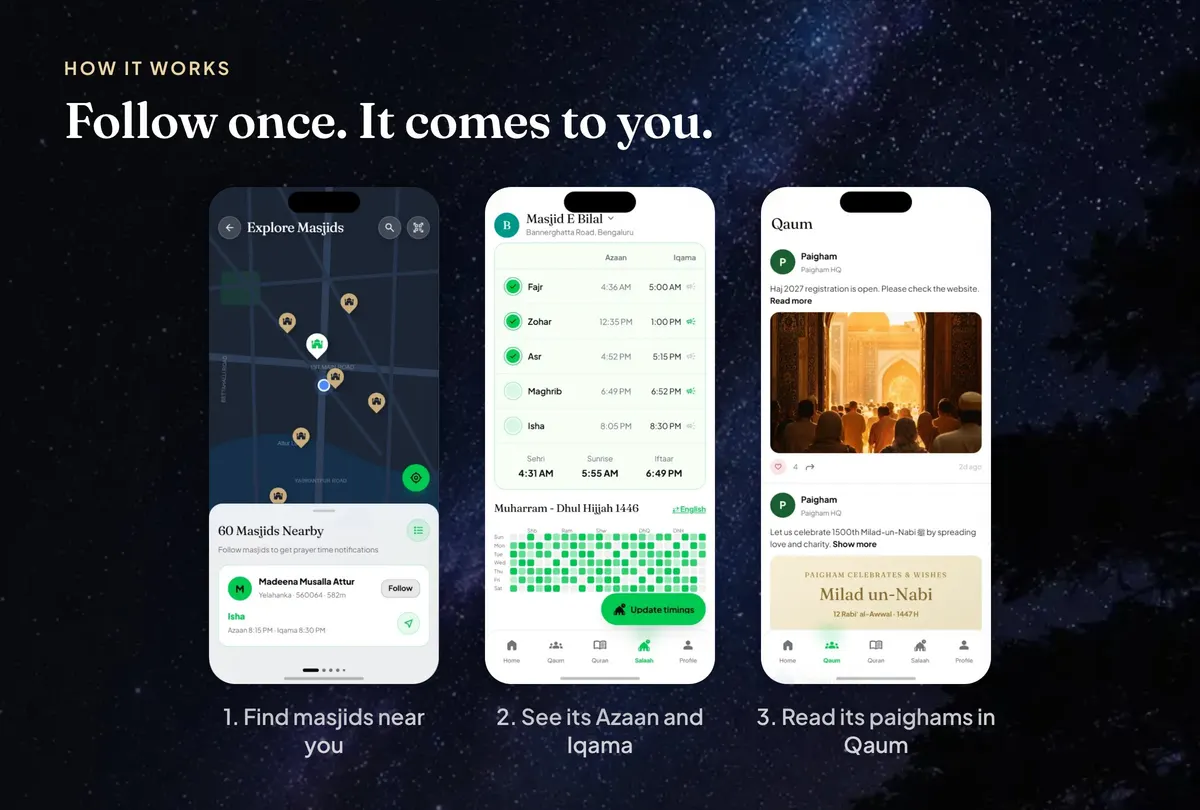
Each masjid publishes its own times, and for every prayer you see two:
✅ Azaan: the call to prayer.
✅ Iqama: when the congregation begins.
So you know when to leave home, and when the prayer starts. Jumah appears where the masjid holds it, and you can switch reminders on or off for each prayer. ⏱️
No timetable from the masjid yet? Paigham calculates Salaah times for your area, using the Karachi method with the Hanafi method for Asr.
Paighams: Announcements That Actually Arrive 📢
A masjid's committee can send a paigham to everyone who follows it: a written message, a short voice note, or photos of a poster. Paighams from the masjids you follow appear in Qaum, right next to everything else from your community.
The notice board, finally in your pocket. 📌
Qaum: Your Community Tab 🤝
Qaum has two parts:
✅ Aam: public community updates, with news from Paigham and posts from the masjids you follow.
✅ Apne: your own groups and areas, the people and places closest to you.
The neighbourhood's news, kept together in one place. 🏘️
Quran, Hadith and Duas
Read the Quran by surah or by juz. Search the Hadith library and read a collection. Find duas by category and chapter in Dua Dikhr, and the names of Allah in Asma ul Husna.
Everyday Tools, All in One Toolkit 🧰
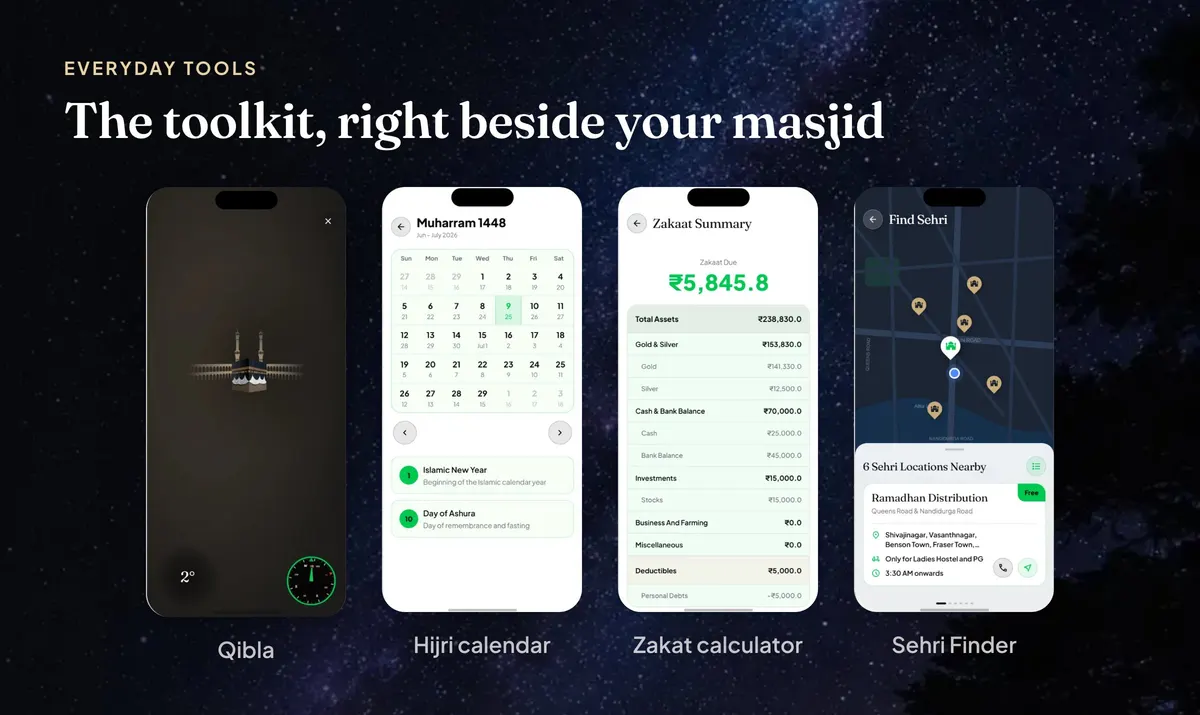
✅ Qibla: find the Qibla direction on the website or in Paigham.
✅ Hijri calendar: with a year view in Paigham, and today's Hijri date on the website.
✅ Zakat calculator: work out your Zakat, save the calculation and review a summary in Paigham, or use the zakat calculator on the website.
✅ Sehri Finder: during Ramadan, the Sehri places near you, nearest first, with a number to call.
✅ Salaah times: for your area at namaz time, plus the Ramadan timetables.
Run a Masjid? There's a Console for That 🛠️
If you're on a masjid committee, Paigham gives you a console in the same place your musalleen already read. Invite members by phone number, give each member a role, and decide who may do what. Publish the masjid's Salaah timings, including Jumah, and keep them up to date. Send paighams in writing, by voice note, or with photographs.
Registering a masjid is free. The committee adds the masjid's details, pins its entrance on the map, adds the required photographs and submits it for review. Every masjid is reviewed before it goes live. The masjids page has the steps.
Final Thoughts 💡
If you take three things from this tour:
✅ Paigham starts with your masjid. Follow it once, and its timings and paighams come to you.
✅ Committees get one place to reach everyone. Timings, notices and roles, together.
✅ Your everyday tools live alongside. Qibla, the Hijri calendar and Zakat, in the same app.
What's Next? 🚀
We're writing guides for committees and for the seasons ahead, starting with a playbook for masjid committees and a guide to Ramadan 1448. Follow the blog's feed so you don't miss them.
💬 What do you think? What would make Paigham more useful for your masjid or your neighbourhood? Write to us.
Get the Paigham app: free on iPhone and Android. Find your masjid, follow it, and see its timings and announcements in one place.
See you in Qaum! 🤝